Générateurs d'art IA
Créer
Anonymous User

Ceramic Sculpture (pottery) Generator

The ceramic sculpture generator creates stunning AI images of handcrafted pottery, glazed vessels, and clay sculptures from a simple text description. Choose from 30+ AI models, dial in surface textures from matte stoneware to crackle glaze, and bring your creative vision to life. Free daily credits, no download required.

No payment or credit card required.

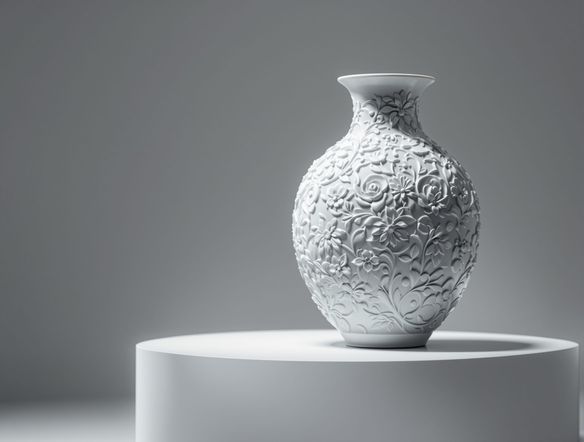
Create a detailed ceramic sculpture of a tall stoneware vase with a rich teal crackle glaze, visible throwing lines, and a warm studio-light photograph composition on a neutral linen background.

Vu dans

msn.com
mashable.com
forbes.com
bbc.co.uk
techcrunch.com
vice.com
aol.com
news.yahoo.com
Show a collection of ceramic vessels in different traditions: a raku-fired black bowl, a delicate porcelain teapot with celadon glaze, and a rough terracotta coil pot, arranged on a wooden shelf with warm natural light.

Every clay tradition

Free AI Ceramic Sculpture Generator

Generate ceramic art across a full range of styles: raku-fired terracotta, high-fire porcelain, salt-glazed stoneware, or hand-coiled earthenware. NightCafe gives you access to 30+ AI models including Nano Banana, Flux, GPT Image, and Seedream, each rendering clay textures and firing effects differently so you can find the exact look your project needs.

Créer des images IA

How to Use the Ceramic Sculpture Generator

Étape 1

Open and describe

No account required. Open this page and type a description: clay type, form, glaze color, or cultural style.

Étape 2

Choose a model

Pick from Flux, GPT Image, Seedream, or other models to find the rendering style that best captures your ceramic vision.

Étape 3

Refine and share

Iterate on glaze, texture, or composition, then save your image or share it with the NightCafe creative community.
Illustrate an AI-transformed ceramic design: a hand-drawn sketch of a bowl on one side and a fully realized, photorealistic glazed stoneware bowl with cobalt blue brushwork on the other, side by side on a studio worktable.

From sketch to sculpture

Design Glazed Pottery and Clay Art Online

Upload a rough sketch, a reference photograph, or an existing pottery design and use image-to-image to shift it into a fully rendered ceramic artwork. Adjust influence strength to keep the original form while exploring new surface decorations, glaze colors, or firing techniques. Perfect for potters brainstorming new pieces and designers creating decor-inspired visuals.

Besoin d'inspiration ?

Découvrez quelques-unes des meilleures créations réalisées par la communauté NightCafe.

902
8
399
Elegant Victorian Picnic in Intricate Kirigami Paper Art Sty...
342
2
Venice Fireworks in Luminous Ink Style
238
2
Portrait of Serenity
125
Lara Croft Ascends Snowy Mountain in Stylish Snow Boots
Explorez plus

Outils associés

Outil Na'vi  Character Maker

Na'vi  Character Maker

Create stunningly realistic Na'vi characters with our AI generator. Design your unique photorealistic female Na'vi or a compelling realistic avatar character portrait for your next project.

Outil Neon Cyber Noir Generator

Neon Cyber Noir Generator

The Neon Cyber Noir Generator creates moody, rain-soaked AI art blending neon-lit cyberpunk cityscapes with classic noir atmosphere. Choose from 30+ AI models, describe your scene or character, and get dark, atmospheric art in seconds. Free daily credits, no download required.

Outil Swiss Style Graphic Generator

Swiss Style Graphic Generator

The Swiss Style Graphic Generator creates crisp, grid-based designs inspired by the International Typographic Style: bold geometry, primary color palettes, and clean modernist composition. Choose from 30+ AI models, describe your layout or subject, and refine until the design clicks. Free daily credits, no download required.

Outil Bauhaus Poster Design Generator

Bauhaus Poster Design Generator

The Bauhaus poster design generator creates bold, geometric AI art in the classic modernist tradition: primary colors, clean sans-serif typography, and balanced form. Choose from 30+ AI models, describe your composition, and iterate until it looks exhibition-ready. Free daily credits, no download or design software required.

Questions Fréquemment Posées

Common questions about AI pottery and ceramic art on NightCafe

Is the ceramic sculpture generator free to use?

Yes. NightCafe provides free daily credits so you can generate ceramic and pottery art without entering payment details. Paid plans offer more daily credits and premium features for creators who want to generate more images or access higher-priority rendering.

Which AI models work best for pottery and ceramic textures?

NightCafe offers 30+ models including Flux, GPT Image, Nano Banana, and Seedream. For ceramic art, different models handle surface texture and glaze effects differently. Trying a couple of models side by side on the same pottery prompt is the fastest way to find your preferred look.

Can I use the ceramic art I generate commercially?

Yes, including on the free plan. NightCafe transfers copyright of generated images to you, the creator, so you can use your ceramic artwork for prints, merchandise, book covers, or other commercial purposes. You should own or have permission to use any reference images you upload. AI copyright law is still evolving and varies by country, so checking the rules in your jurisdiction is worthwhile.

Do I need any experience with pottery or art to use this tool?

No prior ceramics or art knowledge is needed. Describing what you want in plain language works well: something like 'a tall blue crackle-glaze vase with a narrow neck' gives the AI enough to create a detailed result. NightCafe's welcoming community is a great place to discover prompt ideas if you want inspiration.

How does NightCafe compare to Midjourney for ceramic art?

NightCafe runs multiple models in one place rather than a single proprietary model, so you can compare how Flux, GPT Image, and Seedream each render the same pottery concept without switching platforms. It also has a built-in creative community focused on hobbyists and makers, which Midjourney does not offer in the same way.

Can I turn a photo of my own pottery into AI art?

Yes. Use the image-to-image feature to upload a photo of a real pot, sketch, or reference object. The generator uses it as a visual anchor and applies the style, glaze treatment, or artistic finish you describe in your prompt, letting you explore new directions for an existing piece.