एआई आर्ट जेनेरेटर्स
क्रिएट करें
Anonymous User

Photo Manipulation Art Generator

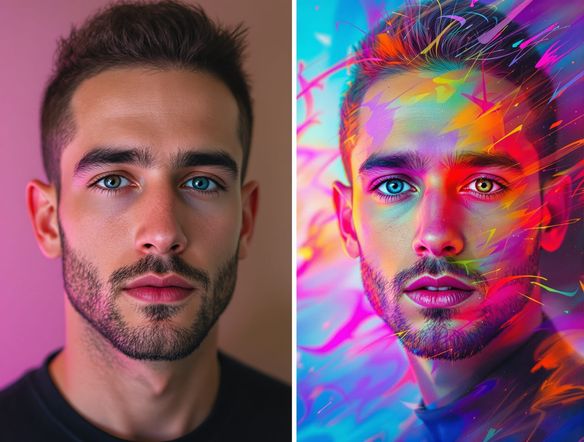
The photo manipulation art generator transforms any photo into surreal, composite, or dramatically reimagined AI artwork in seconds. Upload an image, describe the effect you want, and choose from 30+ models including Flux, GPT Image, and Seedream to push your photo into new creative territory. Free daily credits, no download required.

No payment or credit card required.

Create a dramatic photo manipulation artwork showing a person standing inside a surreal dreamscape where the sky has melted into swirling galaxies and the ground dissolves into ocean waves, with cinematic lighting and rich saturated colors.

जैसा देखा गया

msn.com
mashable.com
forbes.com
bbc.co.uk
techcrunch.com
vice.com
aol.com
news.yahoo.com
Illustrate a double-exposure photo manipulation where a human silhouette is filled with a dense forest scene at golden hour, blending portrait and landscape into one seamless cinematic composition.

Many styles, one place

Free AI Photo Manipulation Generator

NightCafe gives you access to 30+ AI models, including Nano Banana, GPT Image, Flux, and Seedream, each handling photo manipulation differently. Some excel at surreal double-exposure effects, others at painterly composite scenes or glitch-art distortion. Switch models side by side to find which interpretation best matches the mood you are chasing, all without leaving the platform.

एआई इमेजेस क्रिएट करें

How to Use the Photo Manipulation Art Generator

स्टेप 1

Open and upload

No account needed. Open the generator in your browser and upload your photo or start from a text prompt.

स्टेप 2

Describe the effect

Type the manipulation you want: surreal composite, glitch distortion, fantasy environment swap, or dramatic lighting overhaul.

स्टेप 3

Generate, refine, and share

Pick a model, generate, then tweak your prompt or try another model and share results with the NightCafe creative community.
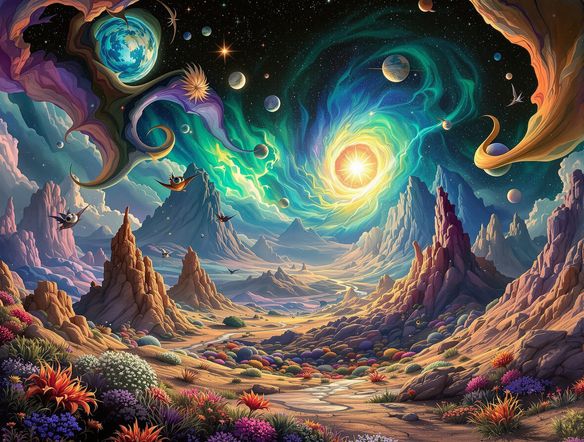
Show a cityscape photograph being transformed into a surreal floating island composition, with buildings lifting into the clouds, waterfalls cascading from skyscrapers, and a vivid twilight sky replacing the original background.

Start from your own image

Turn Any Photo Into Surreal Composite Art

Upload your own photo as a reference and use image-to-image generation to keep the core composition while layering in dramatic manipulations. Adjust transformation strength so recognizable elements, a face, a skyline, a product shot, stay anchored while the AI remixes lighting, texture, and environment into something impossible to shoot with a camera.

प्रेरणा चाहिए?

NightCafe समुदाय द्वारा बनाई गई शीर्ष रचनाओं को देखें।

907
8
405
Elegant Victorian Picnic in Intricate Kirigami Paper Art Sty...
345
2
Venice Fireworks in Luminous Ink Style
282
2
Portrait of Serenity
Mordor She Wrote
311
2
101
Caterpillar and apple
और देखें

संबंधित टूल्स

Na'vi  Character Maker टूल

Na'vi  Character Maker

Create stunningly realistic Na'vi characters with our AI generator. Design your unique photorealistic female Na'vi or a compelling realistic avatar character portrait for your next project.

Neon Cyber Noir Generator टूल

Neon Cyber Noir Generator

The Neon Cyber Noir Generator creates moody, rain-soaked AI art blending neon-lit cyberpunk cityscapes with classic noir atmosphere. Choose from 30+ AI models, describe your scene or character, and get dark, atmospheric art in seconds. Free daily credits, no download required.

Swiss Style Graphic Generator टूल

Swiss Style Graphic Generator

The Swiss Style Graphic Generator creates crisp, grid-based designs inspired by the International Typographic Style: bold geometry, primary color palettes, and clean modernist composition. Choose from 30+ AI models, describe your layout or subject, and refine until the design clicks. Free daily credits, no download required.

Bauhaus Poster Design Generator टूल

Bauhaus Poster Design Generator

The Bauhaus poster design generator creates bold, geometric AI art in the classic modernist tradition: primary colors, clean sans-serif typography, and balanced form. Choose from 30+ AI models, describe your composition, and iterate until it looks exhibition-ready. Free daily credits, no download or design software required.

अक्सर पूछे जाने वाले प्रश्न

Common questions about AI photo manipulation art on NightCafe

Is the photo manipulation art generator free to use?

Yes. NightCafe provides free daily credits so you can generate manipulated art without a credit card. Paid plans offer more daily credits and access to premium features if your projects demand higher volume.

Do I need to sign up before I can use it?

No account is required to get started. You can open the generator and begin creating photo manipulation art immediately. Signing up lets you save your creations, build on past generations, and join the NightCafe community to share and discover work from other creators.

Which AI models are available for photo manipulation?

NightCafe hosts 30+ AI image models including Nano Banana, GPT Image, Flux, Seedream, and more. Each model interprets photo manipulation differently, making it worth comparing outputs across a few models to find the look that fits your project, whether that is surreal compositing, painterly distortion, or cinematic scene replacement.

Can I use photo manipulation art I create here commercially?

Yes, including on the free plan. NightCafe assigns copyright to the creator, so you own the output and can use it commercially, for example in album artwork, book covers, posters, or client projects. You must own or have the rights to any reference photos you upload. AI copyright law is still evolving and varies by country, so it is worth checking the rules in your jurisdiction.

How is this different from using Photoshop or traditional photo editing software?

Traditional photo editing requires technical skill, layer management, and considerable time. The AI photo manipulation generator lets you describe a dramatic effect in plain language and produces a fully rendered result in seconds. It is best for creative exploration and concept generation rather than pixel-precise retouching, making it ideal for hobbyists, content creators, and anyone experimenting with surreal or fantasy imagery.

Can I upload any photo as a starting point?

Yes. The image-to-image feature accepts your own photos as references. You control how strongly the AI transforms the original by adjusting the generation strength, keeping recognizable elements like a portrait or landscape intact while the manipulation layer adds surreal, composite, or fantastical details on top.