Generatori di arte AI
Creare
Anonymous User

Watercolor Painting Generator

The watercolor painting generator turns text descriptions or photos into soft, brushstroke-rich AI art in seconds. Choose from 30+ models, dial in the wash intensity and detail level, and produce everything from loose botanical studies to detailed watercolor portraits. Free daily credits, no download or account required to start.

No payment or credit card required.

Create a luminous AI watercolor painting of a sunlit countryside meadow with wildflowers, featuring wet-on-wet pigment blooms, translucent color washes, visible paper texture, and expressive loose brushwork.

Visto su

msn.com
mashable.com
forbes.com
bbc.co.uk
techcrunch.com
vice.com
aol.com
news.yahoo.com
Illustrate a side-by-side comparison feel: a delicate watercolor botanical study on the left with fine linework and translucent layered petals, and a bold impressionistic watercolor seascape on the right with heavy pigment pooling and loose wet brushstrokes.

Every watercolor style, one place

Free AI Watercolor Painting Generator Online

NightCafe gives you 30+ AI models including Nano Banana, GPT Image, Flux, and Seedream, each rendering watercolor differently. One model produces tight botanical illustration with crisp edges; another delivers a drenched, pigment-heavy wash. Switch between them without starting over to find the exact mood your painting needs. Free daily credits mean you can experiment freely.

Creare immagini AI

How to Use the Watercolor Painting Generator

Passo 1

Open and describe

No account needed. Open the generator, then type your scene, subject, and any style notes like 'soft wash' or 'botanical detail'.

Passo 2

Choose a model or upload a photo

Pick from 30+ models to match your watercolor feel, or upload a reference photo for image-to-image watercolor conversion.

Passo 3

Refine and share

Tweak your prompt, try another model, then save your watercolor painting or post it to the NightCafe creative community.
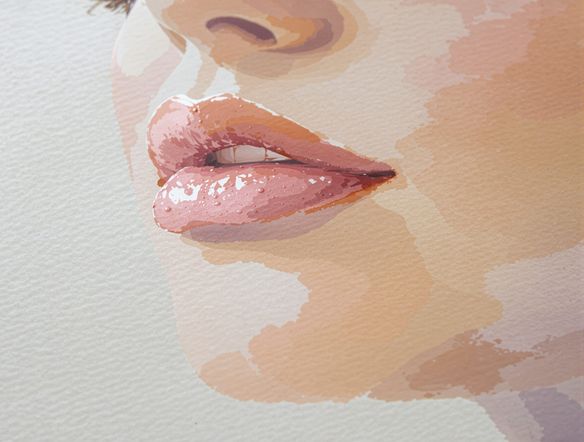
Show a portrait photograph reimagined as a loose watercolor painting with soft diffused skin tones, subtle pigment blooms, white paper highlights left unpainted, and flowing wet brushstrokes in the background.

Paint from your own photo

Turn Any Photo Into a Watercolor Painting

Upload a reference photo and use image-to-image generation to preserve your composition while transforming it into a painted watercolor style. Adjust the influence strength so a portrait keeps a person's likeness, or a cityscape holds its architecture, while colors bloom into soft washes and hard edges dissolve into natural brushwork. Great for prints, book covers, and greeting cards.

Hai bisogno di ispirazione?

Scopri alcune delle migliori creazioni realizzate dalla community di NightCafe.

907
8
345
2
Venice Fireworks in Luminous Ink Style
282
2
Portrait of Serenity
Mordor She Wrote
313
2
335
2
Where Passion Wore Gold
Esplora Altro

Strumenti correlati

Strumento Na'vi  Character Maker

Na'vi  Character Maker

Create stunningly realistic Na'vi characters with our AI generator. Design your unique photorealistic female Na'vi or a compelling realistic avatar character portrait for your next project.

Strumento Neon Cyber Noir Generator

Neon Cyber Noir Generator

The Neon Cyber Noir Generator creates moody, rain-soaked AI art blending neon-lit cyberpunk cityscapes with classic noir atmosphere. Choose from 30+ AI models, describe your scene or character, and get dark, atmospheric art in seconds. Free daily credits, no download required.

Strumento Swiss Style Graphic Generator

Swiss Style Graphic Generator

The Swiss Style Graphic Generator creates crisp, grid-based designs inspired by the International Typographic Style: bold geometry, primary color palettes, and clean modernist composition. Choose from 30+ AI models, describe your layout or subject, and refine until the design clicks. Free daily credits, no download required.

Strumento Bauhaus Poster Design Generator

Bauhaus Poster Design Generator

The Bauhaus poster design generator creates bold, geometric AI art in the classic modernist tradition: primary colors, clean sans-serif typography, and balanced form. Choose from 30+ AI models, describe your composition, and iterate until it looks exhibition-ready. Free daily credits, no download or design software required.

Domande frequenti

Common questions about AI watercolor painting on NightCafe

Is the watercolor painting generator free to use?

Yes. NightCafe provides free daily credits so you can generate watercolor paintings without entering a payment method. Paid plans offer more daily credits and access to premium features if you want to create more or experiment with higher-resolution outputs.

Which AI models work best for watercolor-style paintings?

NightCafe offers 30+ models including Nano Banana, GPT Image, Flux, and Seedream. Each renders watercolor differently: some favour tight detail and fine linework, others produce loose, pigment-heavy washes. The best approach is to generate the same prompt across a couple of models and compare results directly.

Can I use my AI watercolor paintings commercially?

Yes, including on the free plan. NightCafe transfers copyright of generated images to the creator, so you can use your watercolor art for prints, book covers, album artwork, greeting cards, or other commercial projects. If you upload a reference photo, you must own it or have permission to use it. Copyright law around AI art is still evolving, so check the rules in your own country.

Do I need to sign up or install anything to make watercolor paintings?

No installation is required. You can start generating watercolor paintings directly in your browser with no account. Creating a free NightCafe account unlocks daily credits, the ability to save your gallery, and access to the community where you can share and get feedback on your art.

Can I turn a photo into a watercolor painting, or is it text-only?

Both workflows are supported. Type a text description to generate from scratch, or upload a photo to use image-to-image generation. Adjust the influence strength to control how closely the output follows your photo's composition and subject while shifting into a watercolor painting style.

How does NightCafe compare to Midjourney for watercolor art?

NightCafe runs 30+ models in one place, so you are not locked to a single aesthetic. You can compare watercolor results across Flux, GPT Image, Seedream, and others side by side. NightCafe also has a social community built in, making it easy to share paintings, get feedback, and discover inspiration from other watercolor art creators.