⚡ Ends Sunday: 50% Off Annual PRO ⚡ Get 6 months FREE →
Generate Your Own Forest Adventure Images
Create your own mysterious forest scenes with our free AI image generator. It's easy to bring your ideas to life.

2 years ago
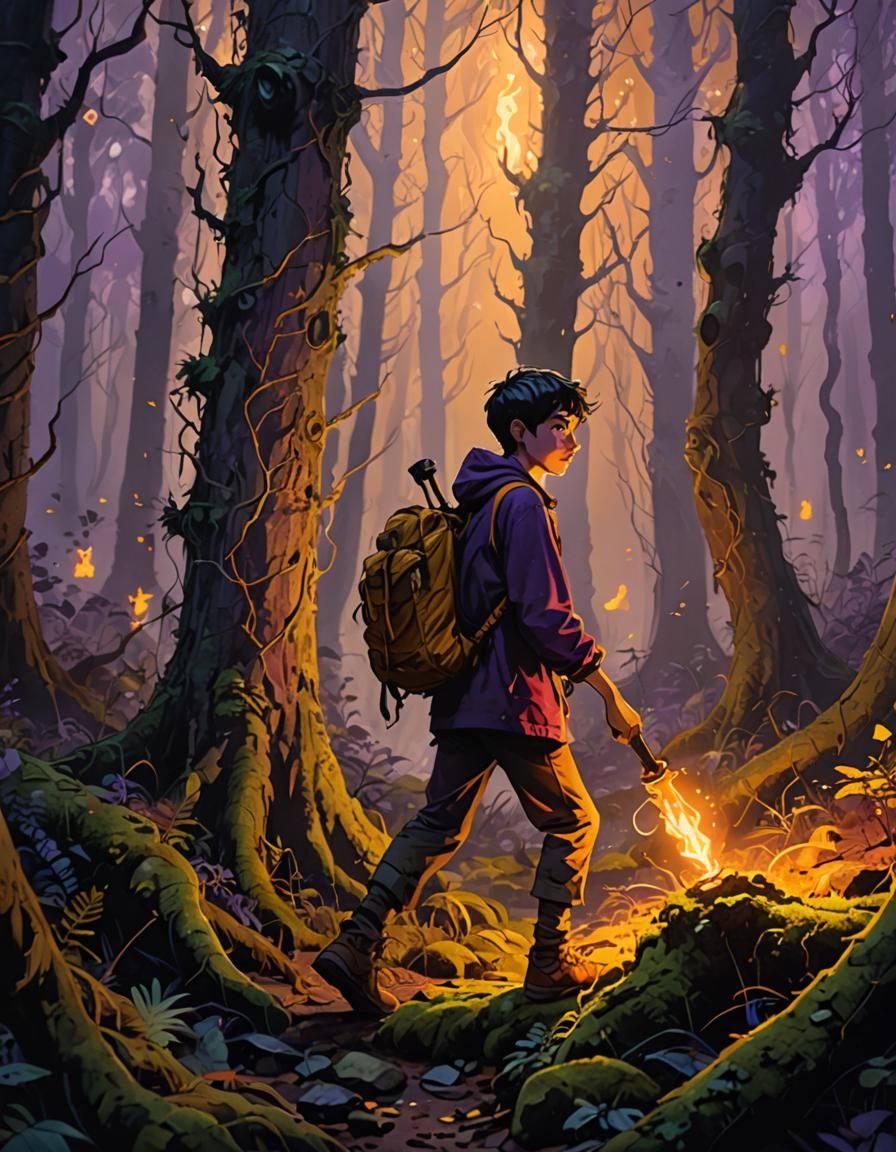
At night, in a dense forest, a 13-year-old boy is walking with a torch in his hand, searching for something in the ground.
Creado hace 2 years ago · 1 comentario· 0 Me gusta
Dreamshaper XL Lightning

Resumen de creación por Vincent
Boy with Torch in Forest: Fantasy Concept Art
This image shows a young boy with a torch exploring a misty forest at night. The fantasy art uses warm torchlight to contrast with the cool, bluish-purple background, highlighting the detailed environment.
Creado por Anonymous User el Sep 16, 2024 usando el modelo generador de imágenes de IA Dreamshaper XL Lightning.
1 comentario
Únete a la conversación
Alex Aslanidis @ScarTissue
Nice but it looks more like he's an arsonist readying to set the whole forest ablaze.
2024-10-03T17:38:01.401ZReply
Configuraciones de Creación
- Estilo de preajuste
NightCafe
- Prompts de texto
- At night, in a dense forest, a 13-year-old boy is walking with a torch in his hand, searching for something in the ground.Weight: 1detailed matte painting, deep color, fantastical, intricate detail, splash screen, complementary colors, fantasy concept art, 8k resolution trending on Artstation Unreal Engine 5Weight: 0.9
- Modelo
- Resolución inicial
Medium
- Relación de aspecto
3:4
- Tiempo de ejecución
Long