AI Art Generators
Create
Anonymous User

AI Home Design Generator

The AI home design generator turns a text description or room photo into a polished interior or exterior concept in seconds. Choose from 30+ models including Flux, GPT Image, and Seedream to explore styles from Scandinavian minimalism to bold maximalism. Free daily credits, no download required.

No payment or credit card required.

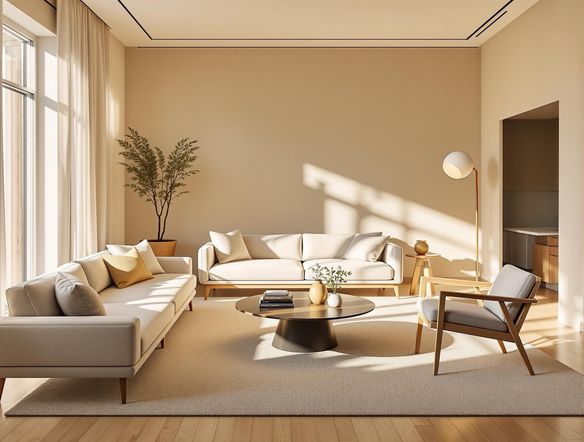
Create a bright, airy living room interior design concept with large windows, natural wood furniture, soft neutral linen sofas, indoor plants, and warm afternoon light streaming across a polished concrete floor. Photorealistic architectural visualization style.

As Seen In

msn.com
mashable.com
forbes.com
bbc.co.uk
techcrunch.com
vice.com
aol.com
news.yahoo.com
Illustrate a side-by-side mood board of three distinct interior design styles: a minimalist Scandinavian living room with pale wood and white walls, a moody dark Art Deco study with brass accents, and a bright bohemian bedroom with layered textiles and rattan furniture.

Explore every style

Free AI Interior Design Generator

Describe any room style and compare results across Nano Banana, Flux, and Seedream without switching apps. Each model handles materials, lighting, and spatial depth differently, so you can explore a cozy Japandi bedroom, an open-plan industrial kitchen, or a lush maximalist dining room and see which interpretation fits your vision best.

Create AI Images

How to Use the AI Home Design Generator

Step 1

Open and describe

No account needed. Type a room description — style, color palette, furniture mood — directly into the prompt field.

Step 2

Choose a model or upload a photo

Select from 30+ models for different visual feels, or upload a room photo for an AI-powered style transformation.

Step 3

Iterate and share

Refine your prompt, swap models, or adjust image strength, then save your concept or share it with the NightCafe community for feedback.
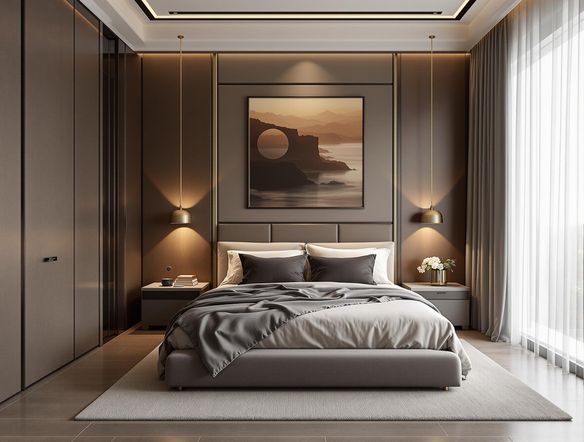
Show a before-and-after concept where a plain, cluttered bedroom is transformed into a serene coastal-style retreat with white shiplap walls, linen bedding, soft blue accents, and warm driftwood tones. Photorealistic interior rendering.

Redesign from a photo

Visualize Your Dream Home with AI

Upload a photo of your existing room and use image-to-image generation to reimagine the space in a completely new style. Adjust the transformation strength to keep the room's layout and proportions while replacing colors, furniture, and finishes — ideal for renovation planning, mood boards, or pitching a design concept to someone else.

Need inspiration?

Check out some of the top creations made by the NightCafe community.

339
Caturday Cool-down
381
2
Where Passion Wore Gold
280
Spooky Tree
291
Journey to the old Fortress
Down the Bookhole
297
2
Feeling Bluetiful
137
2
130
2
Explore More

Related Tools

Na'vi  Character Maker tool

Na'vi  Character Maker

Create stunningly realistic Na'vi characters with our AI generator. Design your unique photorealistic female Na'vi or a compelling realistic avatar character portrait for your next project.

Neon Cyber Noir Generator tool

Neon Cyber Noir Generator

The Neon Cyber Noir Generator creates moody, rain-soaked AI art blending neon-lit cyberpunk cityscapes with classic noir atmosphere. Choose from 30+ AI models, describe your scene or character, and get dark, atmospheric art in seconds. Free daily credits, no download required.

Swiss Style Graphic Generator tool

Swiss Style Graphic Generator

The Swiss Style Graphic Generator creates crisp, grid-based designs inspired by the International Typographic Style: bold geometry, primary color palettes, and clean modernist composition. Choose from 30+ AI models, describe your layout or subject, and refine until the design clicks. Free daily credits, no download required.

Bauhaus Poster Design Generator tool

Bauhaus Poster Design Generator

The Bauhaus poster design generator creates bold, geometric AI art in the classic modernist tradition: primary colors, clean sans-serif typography, and balanced form. Choose from 30+ AI models, describe your composition, and iterate until it looks exhibition-ready. Free daily credits, no download or design software required.

Frequently Asked Questions

Common questions about AI home design on NightCafe

Is the AI home design generator free to use?

Yes. NightCafe provides free daily credits so you can generate home design concepts without entering a payment method. Paid plans offer more daily credits and premium features if you want to create more or access priority generation.

Can I upload a photo of my actual room?

Yes. The image-to-image feature lets you upload a photo of your existing space and transform it into a new style. You control how much the AI changes: a lower strength setting preserves the room layout and proportions while updating colors and furnishings; higher strength reimagines the space more freely.

Which AI models work best for home design?

NightCafe gives you access to 30+ models including Flux, GPT Image, Seedream, and Nano Banana. Flux and GPT Image tend to excel at photorealistic architectural interiors, while other models suit concept art or stylized mood board aesthetics. You can generate with multiple models and compare results in one session.

Can I use the generated home design images commercially?

Yes, including on the free plan. NightCafe assigns copyright of your generated images to you as the creator, so you can use them commercially — for example, in real estate listings, design presentations, or client mood boards. You must own or have the right to use any reference images you upload. Note that AI copyright law is still evolving and varies by country, so checking the rules in your jurisdiction is advisable.

How does NightCafe compare to other AI design tools like Midjourney?

NightCafe brings 30+ models together in one place, so you are not locked into a single image style. It also includes image-to-image uploads, a creative community for sharing and getting feedback, and free daily credits with no subscription required to start. It is built for hobbyists and creative side projects rather than professional enterprise workflows.

Do I need design experience or special software?

None at all. The home design generator works entirely in your browser. Describe the room in plain language — mention style, colors, materials, or mood — and the AI handles the rest. No CAD software, no design background, and no downloads are required to get a polished concept.