AI Art Generators
Create
Anonymous User

Background Generator

The background generator creates stunning, custom AI backgrounds from a text description in seconds. Choose from 30+ AI models to produce anything from serene nature scenes to bold abstract patterns, then download or use directly in your project. Free daily credits, no download required.

No payment or credit card required.

Create a wide cinematic landscape background with a dramatic sunset over misty mountains, rich warm gradient skies, and soft volumetric light rays, photorealistic quality with a sweeping sense of depth.

As Seen In

msn.com
mashable.com
forbes.com
bbc.co.uk
techcrunch.com
vice.com
aol.com
news.yahoo.com
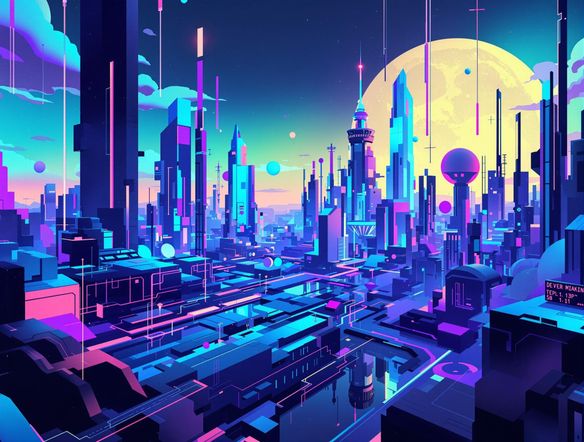
Show a grid of four distinct AI-generated background panels: a lush tropical jungle scene, a neon-lit futuristic cityscape, a minimal pastel gradient, and a cozy autumn forest clearing. Each panel is wide format and richly detailed.

Every style, one place

Free AI Background Generator Online

NightCafe gives you access to 30+ models including GPT Image, Flux, Nano Banana, and Seedream, so you can generate photorealistic outdoor scenes, moody cinematic environments, dreamy abstract patterns, or flat design backdrops without switching apps. Compare outputs side by side and dial in the exact look your project needs, all with free daily credits.

Create AI Images

How to Use the Background Generator

Step 1

Open and describe

No account required. Open the background generator and type what you want: scene, mood, colours, and style.

Step 2

Pick a model and ratio

Select a model like Flux or GPT Image, choose a widescreen or square aspect ratio to match your use case, then generate.

Step 3

Save or share

Download your background directly or share it with the NightCafe community for feedback and inspiration.
Illustrate a polished streaming setup scene where the background behind a gaming desk shows a vibrant, AI-generated neon synthwave cityscape at night, with purple and teal glowing lights reflecting on surfaces.

Built for every project

Create Custom Backgrounds for Any Project

Whether you need a Twitch stream background, a desktop wallpaper, a YouTube video backdrop, or a hero image for a website, describe what you need and generate a background sized to fit. Use image-to-image to remix a reference photo into a new style, keeping the composition while shifting the mood, colour palette, or art direction entirely.

Need inspiration?

Check out some of the top creations made by the NightCafe community.

124
The Weight of Silence
280
Spooky Tree
291
Journey to the old Fortress
Feeling Bluetiful
142
2
Down the Bookhole
304
2
190
Hugs for everyone!
130
2
Explore More

Related Tools

Inspirational Quote Generator tool

Inspirational Quote Generator

The inspirational quote generator turns words that matter into beautifully styled AI art images in seconds. Type any motivational phrase, choose a visual mood, and let 30+ AI models render it as a poster, wallpaper, or shareable graphic. Free daily credits, no download or account required to get started.

Etsy Banner Generator tool

Etsy Banner Generator

The Etsy banner generator creates polished, shop-ready header art from a simple text description in seconds. Choose from 30+ AI models, describe your shop's style and products, and refine until it fits your brand. Free daily credits, no download required.

Instagram Logo Generator tool

Instagram Logo Generator

The Instagram logo generator creates polished, on-brand logos and profile images for your Instagram presence in seconds. Choose from 30+ AI models, describe your brand style, and refine until it looks exactly right. Free daily credits included, no download or design experience required.

Badge Generator tool

Badge Generator

The badge generator creates custom badges, emblems, and achievement icons from a text description in seconds. Choose from 30+ AI models, describe your design, and refine the shape, style, and detail until it looks exactly right. Free daily credits, no download or account required to start.

Frequently Asked Questions

Common questions about AI background generation on NightCafe

Is the AI background generator free to use?

Yes. NightCafe provides free daily credits so you can generate backgrounds without entering a card or paying anything upfront. Paid plans offer more daily credits and access to premium features if you need higher volume or additional options.

What kinds of backgrounds can I generate?

You can create photorealistic landscapes, abstract art, seamless textures, futuristic cityscapes, cozy interior scenes, flat design patterns, gradient backdrops, and much more. Because NightCafe includes 30+ models such as Flux, GPT Image, Nano Banana, and Seedream, the style range is enormous — from painterly to hyper-realistic.

Can I use AI-generated backgrounds commercially?

Yes, including on the free plan. NightCafe transfers copyright assignment to you as the creator, meaning you own the output and can use it commercially — for website headers, YouTube thumbnails, streaming overlays, or other projects. If you upload a reference image, make sure you own or have permission to use it. AI copyright law is still evolving in some jurisdictions, so it is worth checking the rules in your country.

What aspect ratios are available for backgrounds?

NightCafe supports multiple aspect ratios including 16:9 for widescreen displays, presentations, and streaming; 1:1 for social media; and 9:16 for mobile wallpapers or vertical video. You can choose the ratio that matches your platform before generating.

Do I need to sign up to generate a background?

No account is needed to get started. You can open the background generator and create immediately in your browser. Signing up (free) lets you save your creations, access your generation history, and share work with the NightCafe community.

How does NightCafe's background generator compare to Canva or other design tools?

Canva offers template-based design editing. NightCafe generates original, one-of-a-kind backgrounds from a text description using multiple frontier AI models, so no two outputs are alike. You get creative control over style, mood, and composition without needing to work within pre-made layouts or stock image libraries.