AI Art Generators
Create

Ethiopian Church Painting Generator

The Ethiopian church painting generator creates AI art inspired by the bold outlines, frontal figures, and jewel-toned palettes of traditional Ethiopian Orthodox church murals and icons. Choose from 30+ AI models, describe your scene or figures, and refine until the style feels authentic. Free daily credits, no download required.

No payment or credit card required.

Create a richly detailed Ethiopian Orthodox church painting in the traditional style: flat perspective, bold black outlines, frontal-facing figures with large expressive eyes, warm ochre and deep blue tempera tones, decorative geometric borders, on an aged parchment-like surface.

As Seen In

msn.com
mashable.com
forbes.com
bbc.co.uk
techcrunch.com
vice.com
aol.com
news.yahoo.com
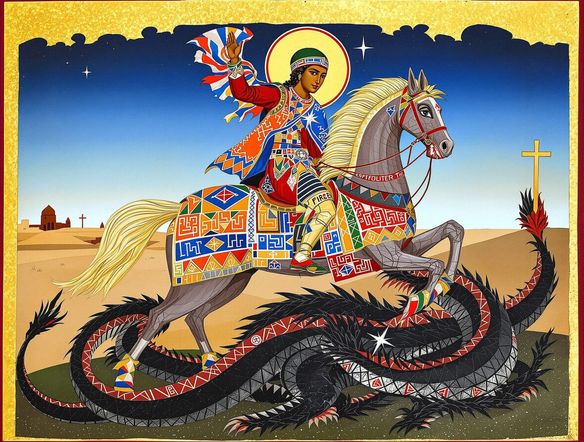
Illustrate a pair of saints in traditional Ethiopian icon painting style, with frontal poses, wide almond-shaped eyes, rich crimson and gold robes, bold outlines, and an ornate geometric border framing the scene.

Authentic style, every model

Free Ethiopian Icon Art Generator

NightCafe brings together 30+ AI image models including Nano Banana, GPT Image, Flux, and Seedream so you can compare how each one captures the flat perspective, saturated pigments, and decorative borders that define Ethiopian religious iconography. Try the same prompt across models to find the look that best honors the tradition you are working in.

Create AI Images

How to Use the Ethiopian Church Painting Generator

Step 1

Open the tool

No account required. Launch the Ethiopian church painting generator directly in your browser and start creating instantly.

Step 2

Describe your scene

Type iconographic details: figures, halos, robes, color palette, border style, or a specific narrative moment from scripture.

Step 3

Refine and share

Switch models, adjust your prompt for more flatness or richer color, then save your piece or post it to the NightCafe creative community.
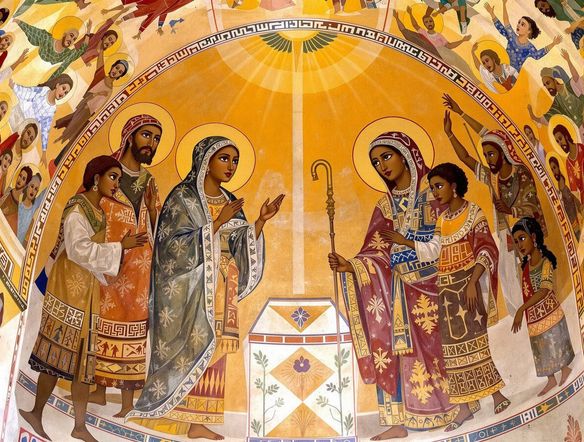
Show an Ethiopian church mural scene depicting a biblical narrative with multiple figures arranged in flat rows, expressive wide eyes, deep indigo and gold color palette, Ge'ez-style script banners, and visible brushstroke texture on aged plaster.

Shape every detail

Create AI Art in Traditional Ethiopian Orthodox Style

Describe specific iconographic elements such as halos, Ge'ez script banners, illuminated manuscript borders, or narrative crowd scenes, and the generator translates them into layered, tempera-style compositions. Upload a reference image and use image-to-image to shift a sketch or photo into the flattened, jewel-bright aesthetic of Lalibela or Gondar church murals.

Need inspiration?

Check out some of the top creations made by the NightCafe community.

260
3
Layered Paper Cat
273
2
264
Giant Woodpecker
342
2
237
The Wind Knows Her Name
Explore More

Related Tools

Na'vi  Character Maker tool

Na'vi  Character Maker

Create stunningly realistic Na'vi characters with our AI generator. Design your unique photorealistic female Na'vi or a compelling realistic avatar character portrait for your next project.

Neon Cyber Noir Generator tool

Neon Cyber Noir Generator

The Neon Cyber Noir Generator creates moody, rain-soaked AI art blending neon-lit cyberpunk cityscapes with classic noir atmosphere. Choose from 30+ AI models, describe your scene or character, and get dark, atmospheric art in seconds. Free daily credits, no download required.

Swiss Style Graphic Generator tool

Swiss Style Graphic Generator

The Swiss Style Graphic Generator creates crisp, grid-based designs inspired by the International Typographic Style: bold geometry, primary color palettes, and clean modernist composition. Choose from 30+ AI models, describe your layout or subject, and refine until the design clicks. Free daily credits, no download required.

Bauhaus Poster Design Generator tool

Bauhaus Poster Design Generator

The Bauhaus poster design generator creates bold, geometric AI art in the classic modernist tradition: primary colors, clean sans-serif typography, and balanced form. Choose from 30+ AI models, describe your composition, and iterate until it looks exhibition-ready. Free daily credits, no download or design software required.

Frequently Asked Questions

Common questions about generating Ethiopian church painting art on NightCafe

Is the Ethiopian church painting generator free to use?

Yes. NightCafe provides free daily credits so you can generate Ethiopian icon-style art without entering a payment method. Paid plans offer more daily credits and access to premium features if you want to create at higher volume.

Which AI models work best for this traditional painting style?

NightCafe offers 30+ models including GPT Image, Flux, Nano Banana, and Seedream. GPT Image handles natural-language style descriptions particularly well, making it a strong starting point for prompts that reference flat perspective, frontal figures, and jewel-toned tempera palettes. You can run the same prompt across multiple models and compare results side by side.

Can I use the generated Ethiopian church paintings commercially?

Yes, including on the free plan. NightCafe transfers copyright of generated images to you as the creator, so you can use the artwork on book covers, prints, album art, or other commercial projects. You should own or have rights to any reference images you upload, and it is worth checking copyright law in your own country, as AI-generated art ownership rules are still evolving in some jurisdictions.

Do I need to sign up before generating?

No sign-up is required to start. You can generate Ethiopian church painting style art immediately from this page. Creating a free account lets you save your creations, build on past prompts, and share work with the NightCafe community.

How does NightCafe compare to Midjourney for niche art styles like Ethiopian iconography?

NightCafe gives you access to 30+ models in one place, so you are not locked into a single rendering approach. For detailed, tradition-specific styles like Ethiopian Orthodox church painting, being able to write descriptive natural-language prompts across models like GPT Image and Flux means more control over elements such as border ornamentation, figure arrangement, and color saturation than a single-model platform typically offers.

What prompts work well for generating Ethiopian church painting art?

Specific descriptions produce the best results. Include references to flat perspective, frontal-facing saints or figures, wide expressive eyes, bold black outlines, and color notes like deep indigo, warm ochre, crimson, or gold leaf. Mentioning border styles, Ge'ez script elements, or narrative crowd arrangements also helps models interpret the iconographic tradition more accurately.