AI Art Generators
Create
Anonymous User

Magazine Cover Generator

The magazine cover generator creates polished, editorial-style AI art that looks straight off the newsstand. Choose from 30+ AI models, describe your concept or upload a portrait, and get a cover-worthy image in seconds. Free daily credits, no download or design skills required.

No payment or credit card required.

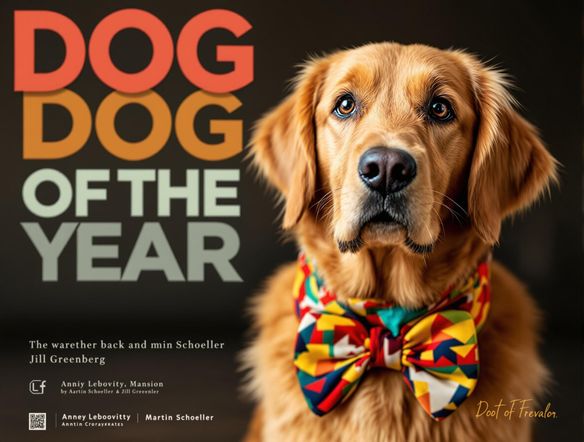
Create a glossy, high-fashion magazine cover composition with a confident model in editorial lighting, bold headline text areas, a clean masthead space at the top, and rich jewel-tone background colors. Studio photography feel, sharp and polished.

As Seen In

msn.com
mashable.com
forbes.com
bbc.co.uk
techcrunch.com
vice.com
aol.com
news.yahoo.com
Show a grid of three distinct magazine cover styles side by side: one high-gloss fashion editorial with dramatic lighting, one retro illustrated pop-art cover with flat bold colors, and one moody cinematic cover with dark dramatic shadows. Each has a visible masthead space.

Every editorial style

Free Magazine Cover Generator Online

Switch between photorealistic portraits, illustrated fashion spreads, vintage retro covers, and bold graphic styles by choosing a different model. NightCafe puts Nano Banana, GPT Image, Flux, Seedream and 30+ more in one place, so you can compare results and find the exact editorial look you want without switching apps or losing your prompt.

Create AI Images

How to Use the Magazine Cover Generator

Step 1

Open and describe your cover

No account needed. Type your cover concept: subject, mood, color palette, and magazine style.

Step 2

Pick a model and generate

Choose from 30+ AI models to match your style, from photorealistic editorial to illustrated or retro cover art.

Step 3

Refine and share

Tweak your prompt, try image-to-image with a photo, then save your cover or share it with the NightCafe community.
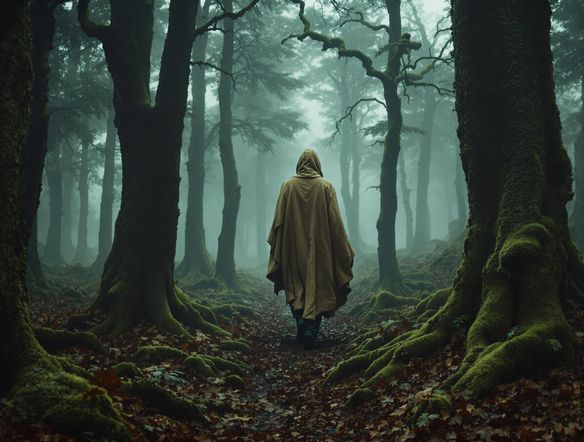
Illustrate a personalized magazine cover featuring a close-up editorial portrait of a person with dramatic studio lighting, a bold serif masthead at the top, floating headline text blocks, and a rich deep-blue gradient background. Photorealistic and polished.

Start from your photo

Make a Custom Magazine Cover with AI

Upload a portrait or reference image and use image-to-image generation to place yourself or a subject into a professional magazine cover composition. Adjust style strength to keep facial features recognizable while the AI adds editorial lighting, background design, and a magazine-layout aesthetic. Perfect for personalized gifts, social media posts, and content creator branding.

Need inspiration?

Check out some of the top creations made by the NightCafe community.

330
Caturday Cool-down
379
2
Where Passion Wore Gold
275
Spooky Tree
190
2
Untitled Creation
101
Caterpillar and apple
266
Journey to the old Fortress
159
The big stretch
Explore More

Related Tools

Inspirational Quote Generator tool

Inspirational Quote Generator

The inspirational quote generator turns words that matter into beautifully styled AI art images in seconds. Type any motivational phrase, choose a visual mood, and let 30+ AI models render it as a poster, wallpaper, or shareable graphic. Free daily credits, no download or account required to get started.

Etsy Banner Generator tool

Etsy Banner Generator

The Etsy banner generator creates polished, shop-ready header art from a simple text description in seconds. Choose from 30+ AI models, describe your shop's style and products, and refine until it fits your brand. Free daily credits, no download required.

Instagram Logo Generator tool

Instagram Logo Generator

The Instagram logo generator creates polished, on-brand logos and profile images for your Instagram presence in seconds. Choose from 30+ AI models, describe your brand style, and refine until it looks exactly right. Free daily credits included, no download or design experience required.

Badge Generator tool

Badge Generator

The badge generator creates custom badges, emblems, and achievement icons from a text description in seconds. Choose from 30+ AI models, describe your design, and refine the shape, style, and detail until it looks exactly right. Free daily credits, no download or account required to start.

Frequently Asked Questions

Common questions about AI magazine cover generation on NightCafe

Is the magazine cover generator free to use?

Yes. NightCafe offers free daily credits so you can generate magazine covers without entering a credit card. Paid plans offer more daily credits and premium features if you want to create at higher volume or access priority generation.

Can I upload my own photo to put on the magazine cover?

Yes. NightCafe's image-to-image feature lets you upload a reference portrait and apply a magazine cover style to it. The AI preserves the composition and key features of your photo while adding editorial lighting, layout structure, and a polished cover aesthetic.

Which AI models work best for magazine cover art?

It depends on the style you want. GPT Image handles photorealistic editorial portraits well. Flux is strong for stylized and high-contrast looks. Nano Banana and Seedream offer different creative takes. NightCafe gives you 30+ models to compare side by side, so you can find the one that fits your exact cover concept.

Can I use my AI-generated magazine cover commercially?

Yes, including on the free plan. NightCafe transfers copyright of generated images to the creator, meaning you own the output and can use it commercially, for content creator branding, zine projects, or merchandise. You should own or have rights to any reference images you upload, and it's worth checking the copyright laws in your own country, as AI-related copyright rules are still evolving in some jurisdictions.

How is NightCafe different from using Canva or Midjourney for a magazine cover?

Canva is a template editor, not an AI image generator, so the creative range is limited to existing layouts. Midjourney generates images but lives inside Discord and has no community sharing feed. NightCafe combines 30+ generative AI models with a social creative community, so you can generate, iterate, and share your magazine covers all in one place, with free daily credits to get started.

Do I need design experience to make a magazine cover with AI?

No design experience is needed. You describe your concept in plain language, such as the subject, color scheme, and mood, and the AI handles composition and style. You can refine results by adjusting your prompt or switching models until the cover looks exactly the way you envisioned it.