AI Art Generators
Create
Anonymous User

Monotype Print Generator

The monotype print generator creates rich, one-of-a-kind AI artwork that mimics the ink textures, plate marks, and expressive bleed of traditional monotype printmaking. Choose from 30+ AI models, describe your composition or upload a reference, and explore styles from delicate ghost impressions to bold ink-on-paper effects. Free daily credits, no download required.

No payment or credit card required.
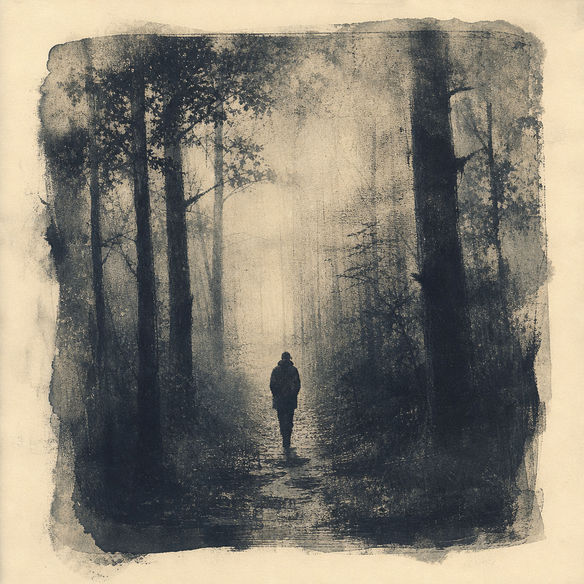
Create a moody monotype print artwork showing a lone figure in a misty forest, with visible ink bleed at the edges, subtle plate texture, rich dark tones bleeding into cream paper, and the hand-pressed imperfection of a fine art monotype.

As Seen In

msn.com
mashable.com
forbes.com
bbc.co.uk
techcrunch.com
vice.com
aol.com
news.yahoo.com
Illustrate a botanical monotype print of wild poppies pressed onto cream paper, showing uneven ink coverage, visible plate edges, ghostly secondary impressions, and rich tonal variation across the petals.

Ink and texture, your way

Free Monotype Print Generator Online

Explore how models like Nano Banana, Flux, Seedream, and GPT Image each interpret ink weight, plate tone, and pigment bleed differently. Dial in a delicate ghost impression or push for a bold, high-contrast print. With 30+ models available on NightCafe, you can compare results side by side and find the monotype aesthetic that suits your project, whether it is a fine art piece, a book cover, or an album visual.

Create AI Images

How to Use the Monotype Print Generator

Step 1

Open and start free

No account needed. Launch the monotype print generator in your browser using your free daily credits.

Step 2

Describe your composition

Type a scene, subject, or mood, or upload a sketch or photo to guide the monotype style with image-to-image.

Step 3

Refine and share

Switch models, adjust your prompt for more ink bleed or contrast, then save your print or share it with the NightCafe community.
Show a cityscape at dusk reinterpreted as a monotype print, with smudged ink skyline, rough plate marks framing the edges, and soft tonal gradients from dark charcoal to pale warm paper.

Start from a sketch or photo

Make AI Monotype Art from a Photo or Prompt

Upload a reference sketch, photograph, or line drawing and use image-to-image generation to translate it into monotype print style. Adjust style strength to keep your original composition recognizable while adding ink spread, paper grain, and printmaking texture. This lets you turn a portrait, landscape, or figure study into a piece that looks genuinely hand-pulled from a printing plate.

Need inspiration?

Check out some of the top creations made by the NightCafe community.

337
Caturday Cool-down
381
2
Where Passion Wore Gold
280
Spooky Tree
192
2
Untitled Creation
291
Journey to the old Fortress
Down the Bookhole
296
2
163
The big stretch
Explore More

Related Tools

Na'vi  Character Maker tool

Na'vi  Character Maker

Create stunningly realistic Na'vi characters with our AI generator. Design your unique photorealistic female Na'vi or a compelling realistic avatar character portrait for your next project.

Neon Cyber Noir Generator tool

Neon Cyber Noir Generator

The Neon Cyber Noir Generator creates moody, rain-soaked AI art blending neon-lit cyberpunk cityscapes with classic noir atmosphere. Choose from 30+ AI models, describe your scene or character, and get dark, atmospheric art in seconds. Free daily credits, no download required.

Swiss Style Graphic Generator tool

Swiss Style Graphic Generator

The Swiss Style Graphic Generator creates crisp, grid-based designs inspired by the International Typographic Style: bold geometry, primary color palettes, and clean modernist composition. Choose from 30+ AI models, describe your layout or subject, and refine until the design clicks. Free daily credits, no download required.

Bauhaus Poster Design Generator tool

Bauhaus Poster Design Generator

The Bauhaus poster design generator creates bold, geometric AI art in the classic modernist tradition: primary colors, clean sans-serif typography, and balanced form. Choose from 30+ AI models, describe your composition, and iterate until it looks exhibition-ready. Free daily credits, no download or design software required.

Frequently Asked Questions

Common questions about the AI monotype print generator on NightCafe

Is the monotype print generator free to use?

Yes. NightCafe provides free daily credits so you can generate monotype print artwork without entering a payment method. Paid plans offer more daily credits and premium features for creators who want to generate more frequently or access priority rendering.

What is a monotype print, and how does the AI recreate it?

A monotype print is a fine art printmaking technique where ink or paint is applied to a flat plate and pressed onto paper, producing a single unique impression with characteristic ink bleed, plate marks, and tonal variation. The AI generator recreates these qualities digitally by learning the visual language of monotype art, including ghost impressions, uneven pigment, and paper texture, from a text prompt or uploaded reference.

Which AI models are available for generating monotype art?

NightCafe gives you access to 30+ models including Nano Banana, GPT Image, Flux, and Seedream. Each model handles ink texture and tonal range differently, so experimenting across a few is a good way to find the monotype look that matches your creative vision.

Can I use my monotype print artwork commercially?

Yes, including on the free plan. NightCafe assigns copyright of generated images to the creator, so you can use your monotype prints for commercial projects such as book covers, album art, or print-on-demand products. You must own or have permission to use any reference images you upload. AI copyright law is still evolving and varies by country, so it is worth checking the rules in your jurisdiction.

How does NightCafe compare to other AI art tools for printmaking styles?

Most general AI art tools treat monotype as one option among thousands of styles with little control. NightCafe lets you compare 30+ specialist models side by side, iterate quickly using free daily credits, and share results with an active community of hobbyist creators who give real feedback. It is built for creative enjoyment, not enterprise workflows, which makes it a natural fit for expressive fine art styles like monotype.

Do I need to install any software or create an account to get started?

No installation is required. The monotype print generator runs entirely in your browser. You can start generating with free daily credits straight away, and creating a free account unlocks saving, sharing, and community features when you are ready.