AI Art Generators
Create
Anonymous User

Game UI Mockup Generator

The game UI mockup generator turns a text description into a polished game interface concept in seconds. Choose from 30+ AI models to create HUDs, inventory screens, main menus, dialogue boxes, and more. Free daily credits, no download or design software required.

No payment or credit card required.

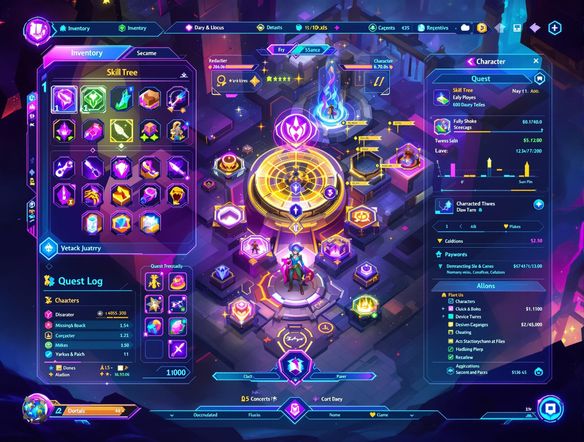
Create a detailed fantasy RPG game UI mockup showing a health bar, inventory panel, minimap, and dialogue box, with ornate medieval styling, glowing accents, and a dark parchment color scheme, presented as a flat screen layout.

As Seen In

msn.com
mashable.com
forbes.com
bbc.co.uk
techcrunch.com
vice.com
aol.com
news.yahoo.com
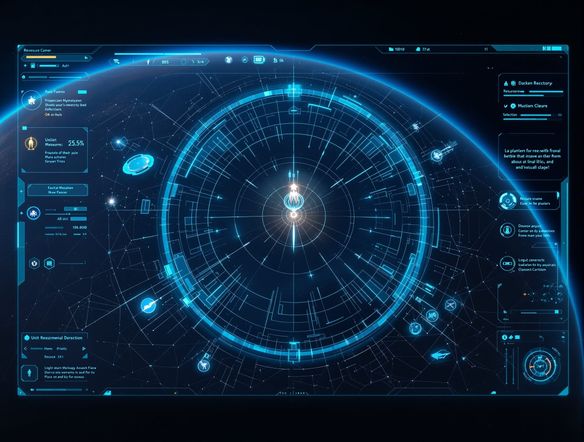
Show a side-by-side comparison of three game UI panel styles: a dark sci-fi holographic HUD with neon blue accents, a pixel-art retro inventory screen with chunky borders, and a clean minimalist mobile game menu with soft gradients.

Any genre, any style

Free Game UI Design Generator Online

Generate fantasy HUDs, sci-fi dashboards, pixel-art menus, or minimalist mobile game interfaces by simply describing your vision. NightCafe gives you access to 30+ models including Nano Banana, Flux, and GPT Image, each producing a distinct visual language. Run the same prompt across models to compare which aesthetic fits your game project best before committing to a direction.

Create AI Images

How to Use the Game UI Mockup Generator

Step 1

Open with no sign-up

No account needed. Launch the game UI mockup generator directly in your browser and start creating immediately.

Step 2

Describe your interface

Type your game genre, UI elements (HUD, menu, inventory), and visual style. Optionally upload a reference layout for image-to-image generation.

Step 3

Generate, refine, and share

Pick your favourite result, swap models, tweak the prompt, then save or share your mockup with the NightCafe community.
Illustrate a dark fantasy game inventory screen concept, showing weapon and armor slots, a character silhouette panel, gold coin counter, and glowing rune borders, rendered as a polished UI mockup on a widescreen game frame.

Iterate from a reference

AI Game Interface Concept Art and Mockups

Upload a screenshot or rough sketch and use image-to-image to transform it into a fully styled game interface mockup while preserving your layout structure. Dial the strength up or down so your existing button placement and panel proportions carry through while the visual style shifts completely. Ideal for game jam prototypes, indie pitches, or early concept sign-off.

Need inspiration?

Check out some of the top creations made by the NightCafe community.

907
8
405
Elegant Victorian Picnic in Intricate Kirigami Paper Art Sty...
345
2
Venice Fireworks in Luminous Ink Style
282
2
Portrait of Serenity
Mordor She Wrote
312
2
Explore More

Related Tools

Na'vi  Character Maker tool

Na'vi  Character Maker

Create stunningly realistic Na'vi characters with our AI generator. Design your unique photorealistic female Na'vi or a compelling realistic avatar character portrait for your next project.

Neon Cyber Noir Generator tool

Neon Cyber Noir Generator

The Neon Cyber Noir Generator creates moody, rain-soaked AI art blending neon-lit cyberpunk cityscapes with classic noir atmosphere. Choose from 30+ AI models, describe your scene or character, and get dark, atmospheric art in seconds. Free daily credits, no download required.

Swiss Style Graphic Generator tool

Swiss Style Graphic Generator

The Swiss Style Graphic Generator creates crisp, grid-based designs inspired by the International Typographic Style: bold geometry, primary color palettes, and clean modernist composition. Choose from 30+ AI models, describe your layout or subject, and refine until the design clicks. Free daily credits, no download required.

Bauhaus Poster Design Generator tool

Bauhaus Poster Design Generator

The Bauhaus poster design generator creates bold, geometric AI art in the classic modernist tradition: primary colors, clean sans-serif typography, and balanced form. Choose from 30+ AI models, describe your composition, and iterate until it looks exhibition-ready. Free daily credits, no download or design software required.

Frequently Asked Questions

Common questions about the game UI mockup generator on NightCafe

Is the game UI mockup generator free to use?

Yes. NightCafe provides free daily credits so you can generate game UI mockups without entering payment details. Paid plans offer more daily credits and premium features for heavier creative sessions.

What kinds of game UI can I generate?

You can create HUDs, main menus, pause screens, inventory panels, dialogue boxes, quest logs, health and stamina bars, skill trees, and more. Just describe the genre and style in your prompt. Fantasy, sci-fi, pixel-art, horror, and minimalist mobile styles all work well.

Can I use generated game UI mockups commercially, such as in an indie game release or game jam entry?

Yes. NightCafe transfers copyright assignment to you as the creator, so you can use your generated mockups commercially, including in indie game projects. You should own or have permission to use any reference images you upload. AI copyright law is still evolving and varies by country, so it is worth checking the rules in your jurisdiction.

Do I need design skills or software like Figma to use this?

No design skills or external software are required. The generator works from plain-language prompts, so describing your game's genre and the interface elements you need is enough to produce a usable visual concept. It works entirely in the browser.

Which AI models are available for game UI mockup generation?

NightCafe gives you access to 30+ models including Nano Banana, GPT Image, Flux, Seedream, and more. Different models handle fine detail, text legibility, and stylization differently, so experimenting across a few models for the same UI prompt can surface very different and useful results.

How does NightCafe compare to using Midjourney or a dedicated UI tool for game mockups?

Unlike Midjourney, NightCafe brings 30+ models together in one place alongside a creative community where you can share your game UI concepts and get feedback. Unlike static design tools, you can iterate with natural-language prompts or image-to-image uploads, making it faster for early-stage concept exploration and game jam prototyping.